Have you ever checked your blood sugar back-to-back and gotten very different readings? Are you feeling like your meter might not be accurate? If so, don't worry—we have a simple way to check!
You can use a control solution to verify if your meter and test strips are working correctly. Just let the care team know through the "Chat with Us" button in the Unified Care app, and we’ll send you a bottle of control solution to test your meter's accuracy.
Before You Test:
Make sure you’re following best practices for getting an accurate reading. Hands should be washed and dry, warm, and the finger should be massaged from the palm up (not by squeezing the fingertip)!
Understanding Blood Sugar Meter Accuracy
All iHealth glucometers are FDA-approved, and they must all be tested to ensure they operate within FDA standards.
The FDA allows for a ±15% accuracy range, meaning two different meters may not give the exact same reading, but both can still be considered accurate. Every meter on the market uses its own proprietary technology to measure blood sugar. This means each device has a slight measuring bias, which can cause differences when comparing readings across different meters. For example, if your true blood sugar is 130 mg/dL, one meter might read 117 mg/dL while another reads 143 mg/dL—both are within FDA-approved accuracy standards.
Because of this, doctors usually focus on trends rather than individual readings. If your blood sugar is trending up, down, or staying the same, that gives more insight into how things are going rather than worrying about small day-to-day variations. 😊
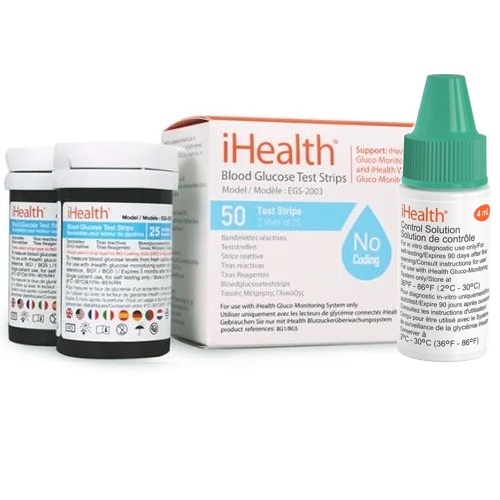
All About Control Solutions to Check Strips
How Control Solution is Used In Factory Testing:
In the factory, each bottle of test strips is calibrated and tested against several control solutions to ensure that they are reading glucose accurately and with an FDA-approved range. After the accuracy range is tested against the control solution, that accuracy range is printed on the side of each test strip bottle that we sell. The range may be different for each batch of test strips we produce (for example, one strip vial may say that Level II accurate range is 75-101mg/dL, but for a different vial of strips made several months later, accuracy range may be 81-107).
If at any time you are wondering if your strips are expired or damaged, you can check their accuracy using the control solution! The iHealth control solution contains a specific quantity of glucose concentrate which is formulated to work with iHealth test strips only. While the factory will test glucose on level 1, 2 and 3 ranges, all the iHealth control solution available on the market are level II solutions so people can ensure their strips are still accurate at home.
How To Use Control Solution at Home:
To use control solution at home, there are only 3 steps, and they’re quite simple:
- Find the Valid Range: The correct range is printed on the test strip vial (e.g., 75-101 mg/dL or 86-116 mg/dL). The correct range is printed on the test strip vial (e.g., 75-101 mg/dL or 86-116 mg/dL). Each batch of test strips has a different range—NEVER mix up your strips into different vials with different ranges!
- Perform the Test
- First, shake the control solution before use.
- Next, place one drop on a clean surface (suggestion: the cap of the bottle works well).
- Last, dip the test strip into the drop, just as you would with a blood sample.
- Check the Result: Compare the reading on your meter with the valid range on the test strip vial.
- ✅ If the result is within the range on the test strip bottle, your meter is accurate.
- ❌ If the result is out of range, double-check with a new test strip
- ❌If the second strip is also out of range, check with a new, unopened bottle of strips!
- ❌ if all three tests are out of range, then contact our Unified Care customer service at (866) 899-3998. While rare, you may actually have a faulty meter!
Troubleshooting
Test strips from all glucose meter companies have very delicate technology inside, that is sensative to light, moisture, temperature changes, and even oxygen! If your meter is fine, and you think that its the bottle of strips that’s a problem, then one of these things may have happened:
- Expired Strips: The control solution expires 90 days after opening—when you open the bottle, write the date to throw it out on the bottle. DO NOT use expired strips. they will be unreliable. In our insurance-covered Unified Care program, you can order more strips for free. Just ask your care team.
- Oxidation: The top was left sligly open: The strips are sensitive to oxygen, and the chemical reageant in the strips may oxidize if you leave the bottle open too long.
- Moisture: The bottle is supposed to be leakproof, but if you leave your strips in the refrigerator, near a hot stove or in a steamy bathroom, or drop the vial in water, the moisture can ruin them.
- Extreme Temperatures: Did you leave your strips in a hot car, in your pocket, or in the sun? The extreme heat can ruin them. Be careful!
When Should You Use a Control Solution Test?
It’s a good idea to check your meter’s accuracy:
- If you don’t know if the strips are expired or not
- If your blood sugar reading seems off from how you feel and your actions in the day
- After exposing your test strips to extreme temperatures or moisture
- If you drop your glucometer
Takeaways
If your control solution test falls outside the valid range, try again with another strip, and with another vial of strips, if necessary. Contact us if you need more help, at (866) 899-3998. Strips are sensitive to temperature, light, oxygen, and also moisture. Keep them safe in a cool, dry, dark place! And remember: Each batch of test strips has a different range—NEVER mix up your strips into different vials with different ranges!
Using a control solution is a quick and easy way to make sure your blood sugar readings are accurate. Remember, small variations between meters are normal, and trends over time are what truly matter. If you ever suspect an issue, reach out to our team, and we’ll guide you through the process. We’re here to help! 😊